.png?width=2365&height=818&name=Floteq-Wide-Reverse%20(2).png "Floteq USA")
Your tap list, live on any screen.
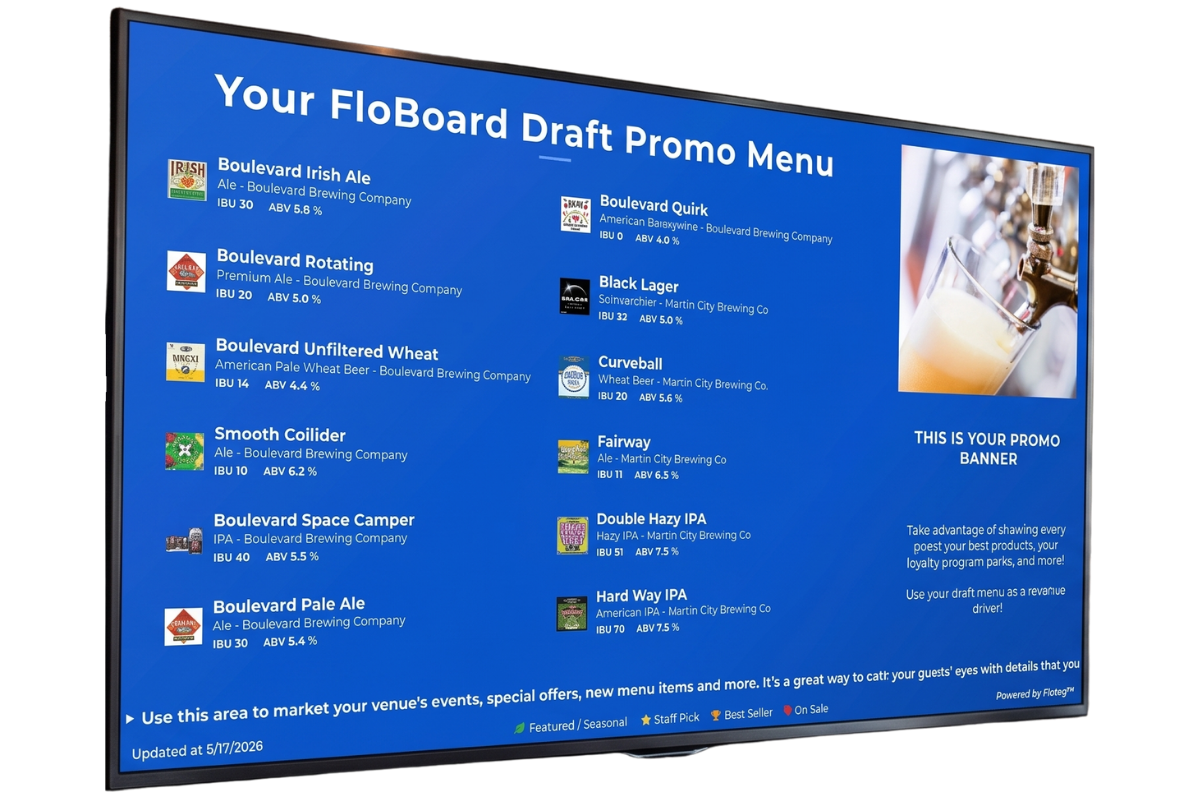
FloBoard™ replaces static menus, chalkboards, and outdated Untappd screens with a live digital display that always shows what's actually pouring — branded to your venue, managed from your phone.
Your tap list changes.
Your display doesn't. If you're venue is managing their draft menu on a display that was never built for it, it's time for FloBoard™.
❌ The Chalkboard
Updated once a week if your artist is available. Wrong the other six days.
Whoever cleaned the board last night also erased the IPA you're still pouring. Guests ask. Staff shrugs. Trust erodes.
❌ The Static TV Slide
On someone's random laptop. An off-brand PowerPoint from 2010.
The draft menu lives in a file on someone's personal computer. When they quit, the slide dies with them. And it never matched the actual kegs anyway.
❌ Untappd & Generic Apps
Maintained manually. Disconnected from your draft lines. No real time control.
You're updating a third-party app to tell guests what's on tap — with no connection to what's actually flowing. It's another thing to keep current that usually isn't.
Three outcomes. One display.
Not a feature list. What your guests and your team actually experience.
𝟭 Always Accurate
What's on your screen matches what's on tap.
FloBoard syncs with your draft lines — no manual updates required when a keg kicks or a new one goes on. Your display always reflects reality.
When connected to PourScore™, tap list updates happen automatically as lines change.
𝟮 Always Branded
Your venue. Your design. Your colors.
Full theme control — fonts, colors, layouts. Your FloBoard looks like it was designed for your bar, not assembled from a template an intern found online.
Custom themes, brand colors, multiple layouts. Holiday themes built in. TV preview before you publish.
Always Managed
Update it from wherever you are.
Computer or mobile app. Change a beer, update a price, swap a layout — without touching the TV. No chalkboard. No laptop cable. No asking the bar manager.
Manage multiple displays across multiple venues from a single dashboard.
Up and running in minutes.
A few steps from blank screen to live display. No technical skills. No IT ticket. No waiting.
Name it, place it, define it.
Give the display a name. Set its location. Choose which draft details to show — ABV, IBU, brewery name, tap number, temperature, pressure. Each display can show different data.
→ One display per TV, or one for the whole bar
→ Multi-venue support — manage all locations from one dashboard
→ Control exactly what information appears per display
Your draft list, automatically or manually.
If you're on PourScore™, your beverages are already here — pull them in with one click. Or build your list from scratch using the beverage database.
→ Auto-import from PourScore™ draft lines
→ Searchable beverage database with 1,000s of beers, wines, and cocktails
→ Add custom items not in the database
Your brand colors. Your fonts. Your details.
Pick your layout, set your brand colors, adjust font styles and sizes, fine-tune spacing. Every FloBoard display should look like it was designed for your specific bar — because it was.
→ Brand color picker — primary, secondary, accent
→ Font size and weight controls for tap names and details
→ Image upload for promotional ads
See exactly how it looks on your TV before you go live.
TV Preview shows your FloBoard rendered at your actual screen resolution. If anything's off, step back and adjust. When it's right — one click to publish.
→ TV Preview at actual display resolutionReview all tap assignments and display data
→ Go back to any previous step without losing your work
→ Publish instantly — live within seconds
No Hardware Required
Works on any TV with a browser, FireStick, AppleTV or Chromecast. No dedicated hardware.
Setup In Under 10 Minutes
From account creation to live display — average first setup.
Manages From Anywhere
Computer or Phone — Full control via desktop or the Floteq mobile app. iOS and Android.
Unlimited Displays per Location
One account covers your whole venue — or all your venues.
FloBoard™ gets better when it knows what's actually pouring.
Standalone, FloBoard™ is an awesome tool for your venue. Connected to PourScore™, it's live — tap list updates happen automatically as your lines change, with no manual maintenance required. The best part, FloBoard™ is included with every PourScore™ subscription at no additional cost.